

Overview
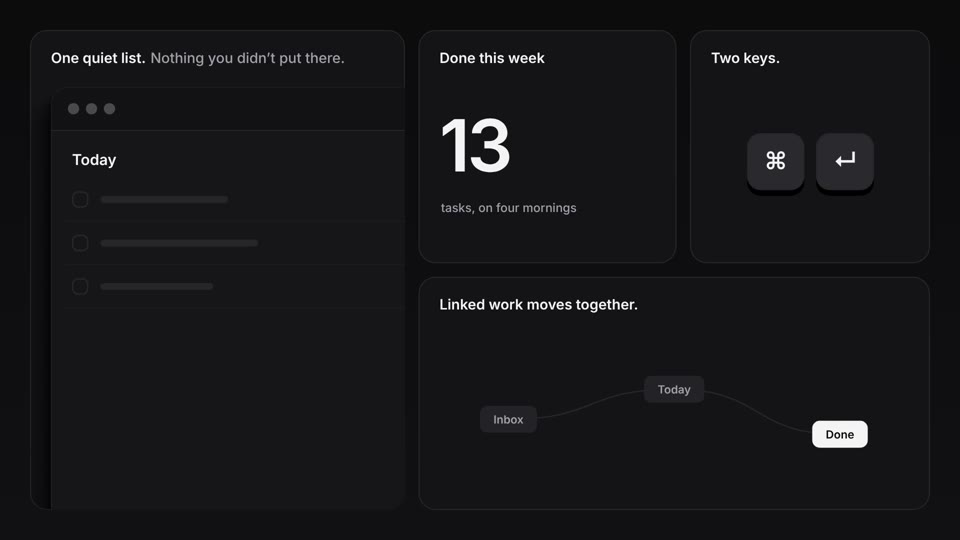
Made with Mografy Stage, in the dark look and with no cursor. Four tiles are planned as one picture: only one shows the app, and the others are a stat, an object and a diagram, so no two neighbours are the same kind. Two keys are pressed, a task is done and the list closes up, the weekly count rolls, and the task travels into Done. Then the week resets.
Motion breakdown
- 0–1.4s
1. Keys
⌘ and ↵ press in the object tile.
- 1.4–2.2s
2. Done
The task checks, strikes through, and the list closes up.
- 2.2–5.7s
3. It travels
12 rolls to 13, a chip travels from Inbox to Done, then everything resets together.
Open the scene
Download and unzip the project, then open it with your installed Mografy CLI.
Download scene projectnpx mografy dev ./stage-bentoWith Mografy installed, npx mografy add stage-bento copies the same project into the examples folder of your Mografy workspace (films that are not installed are downloaded from the showcase). Animation code stays in scenes/main.ts with its helpers in scenes/stage.ts. The ZIP includes the Inter font files and license.
Original prompt
Read the creative brief
Use Mografy Stage to make a dark bento section for a fictional task app called Fieldnote, 6 seconds, looping, no cursor. Plan the grid as one picture: one tall tile shows a piece of the app, the others are a stat, an object and a small diagram. One event should run through all of them: two keys are pressed, a task is done, the weekly count rolls up, and the task travels into Done. Then the week resets.