

Overview
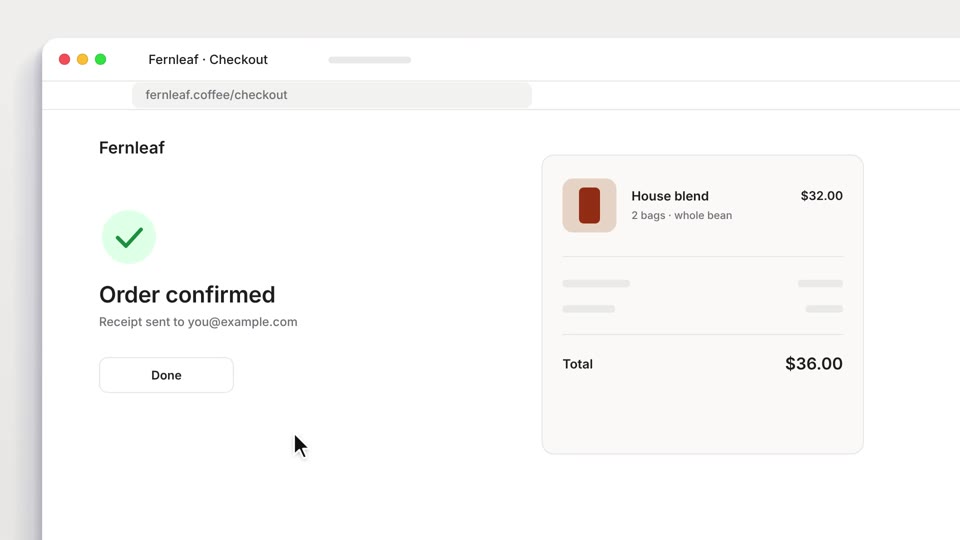
Made with Mografy Stage, in a browser with tabs. The email is typed, Pay is pressed and holds a spinner, and the form gives way to a confirmation whose check draws itself. Done returns to the empty form, which is the loop. The payment fields stay placeholder lines on purpose.
Motion breakdown
- 0–2.8s
1. Email
The field is clicked and the address is typed.
- 2.8–4.5s
2. Pay
Pay is pressed and holds a spinner.
- 4.5–9s
3. Confirmed
The check draws, the confirmation holds, and Done resets the form.
Open the scene
Download and unzip the project, then open it with your installed Mografy CLI.
Download scene projectnpx mografy dev ./stage-checkoutWith Mografy installed, npx mografy add stage-checkout copies the same project into the examples folder of your Mografy workspace (films that are not installed are downloaded from the showcase). Animation code stays in scenes/main.ts with its helpers in scenes/stage.ts. The ZIP includes the Inter font files and license.
Original prompt
Read the creative brief
Use Mografy Stage to make a looping checkout demo for a fictional coffee roaster called Fernleaf, in a browser with tabs. Type an email, press Pay, show a short spinner, then a confirmation with a check that draws itself. Done goes back to the empty form. Keep the payment details as placeholder lines, and show one real line item in the order summary.