

Overview
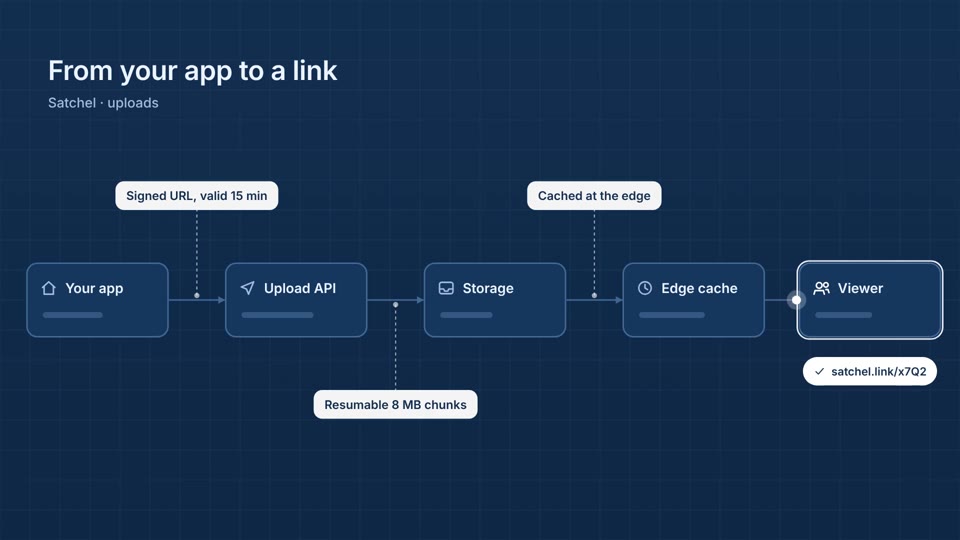
Made with Mografy Stage, in the blueprint look and with no cursor. A file travels from your app to a shareable link through four services, and each hop gets one short annotation that says the thing a developer needs to know. Annotations alternate above and below the line, so they never collide.
Motion breakdown
- 0–2.0s
1. Signed URL
The file leaves your app; the first annotation draws its leader, then its label.
- 2.0–4.4s
2. Chunks and cache
Three chunks travel to storage, then on to the edge.
- 4.4–7.4s
3. A link
The viewer gets a link, it holds, and the diagram fades back.
Open the scene
Download and unzip the project, then open it with your installed Mografy CLI.
Download scene projectnpx mografy dev ./stage-uploadWith Mografy installed, npx mografy add stage-upload copies the same project into the examples folder of your Mografy workspace (films that are not installed are downloaded from the showcase). Animation code stays in scenes/main.ts with its helpers in scenes/stage.ts. The ZIP includes the Inter font files and license.
Original prompt
Read the creative brief
Use Mografy Stage to make a looping blueprint diagram for the API docs of a fictional storage service called Satchel. Show how a file goes from the customer’s app to a shareable link: Upload API, storage, edge cache, viewer. Add one short annotation per hop, no more. No cursor, nothing decorative, and keep each node to its name.