

Overview
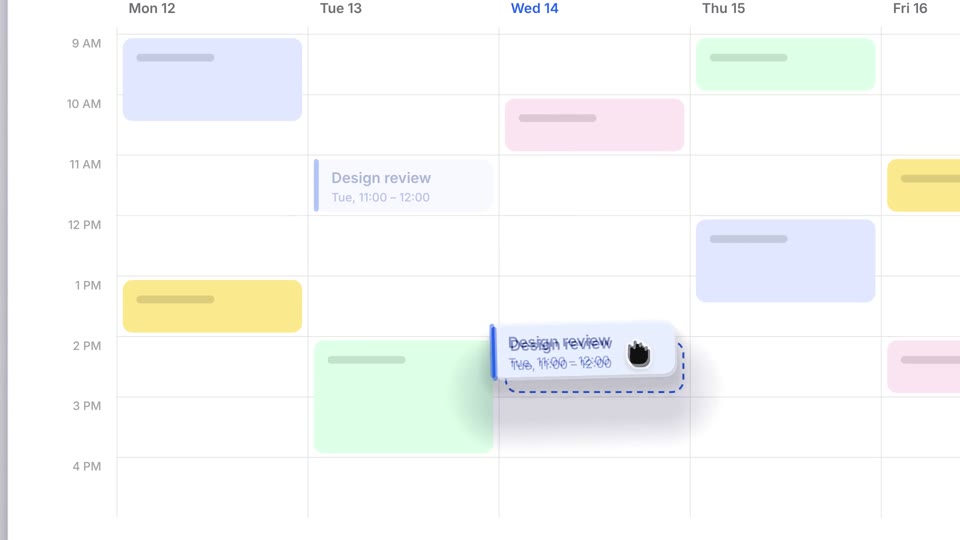
Made with Mografy Stage, in a browser window. The hand picks up a meeting by its edge so the title stays readable; the card lifts and tilts, and the drop target jumps from cell to cell instead of chasing it. On Wednesday it lands, and three attendees confirm one after another. Dragging it back to Tuesday is the loop.
Motion breakdown
- 0–1.4s
1. Lean in
The camera pushes in on Tuesday and Wednesday; the hand moves to the card.
- 1.4–2.6s
2. Carry
The card lifts and follows; the dashed target snaps by cell; it lands on Wed 2 PM.
- 2.6–7.5s
3. Confirm and return
Attendees confirm, the camera returns, and the card is dragged back.
Open the scene
Download and unzip the project, then open it with your installed Mografy CLI.
Download scene projectnpx mografy dev ./stage-calendarWith Mografy installed, npx mografy add stage-calendar copies the same project into the examples folder of your Mografy workspace (films that are not installed are downloaded from the showcase). Animation code stays in scenes/main.ts with its helpers in scenes/stage.ts. The ZIP includes the Inter font files and license.
Original prompt
Read the creative brief
Use Mografy Stage to make a looping demo for a fictional calendar app called Plume, in a browser window. Someone drags “Design review” from Tuesday 11 AM to Wednesday 2 PM. The card should lift under the hand, and the drop target should jump from cell to cell, not slide. When it lands, the attendees confirm. Then drag it back so the loop closes. Only the event and the calendar labels are real words.