

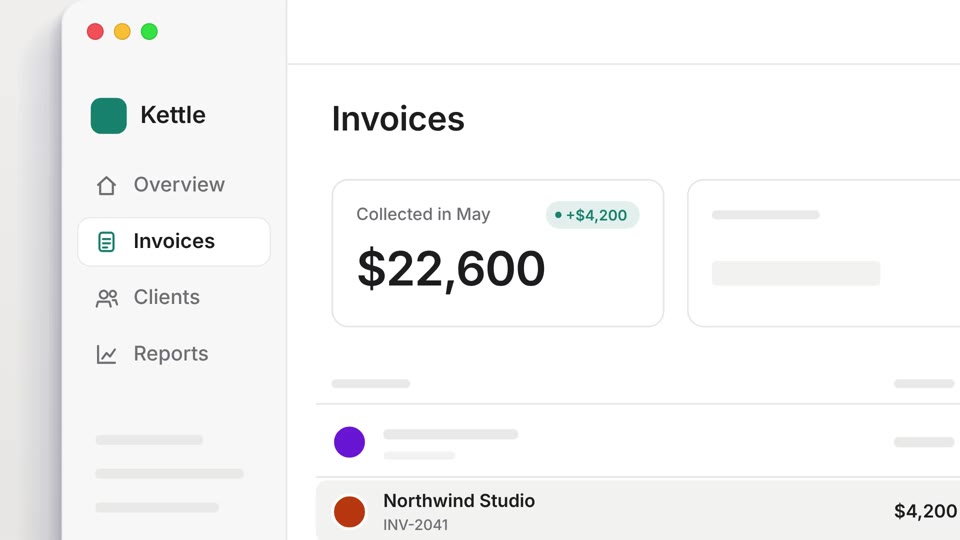
The idea
Agents can already draw an interface. The result usually looks like a screenshot with everything filled in: every cell has words, the whole app floats in the middle, and things change for no reason. Stage is built around one sentence:
It reads as a real product, simplified to what the viewer needs, framed with intent, and every motion has a cause.
Stage is an extra for the Mografy Skill: a way to write the film as a short script, a kit of windows, phones and placeholder lines, and checks that catch a broken loop or text that doesn’t fit. Claude Code or Codex uses it for you; you describe the story.
Start
Ask for one small interaction, in one product, at one size. Name the story and the crop:
Use Mografy Stage to make a 7-second looping homepage hero for our invoicing app.
Story: mark an overdue invoice as paid, the amount flies into this month's total,
then Undo in the toast resets it. Pin the window to the top left so it runs off
the edges, and keep real words only where the story is.
The agent reads the Skill’s Stage guide, starts from the closest example and builds the film. To start from an example yourself, or add Stage to an existing project:
npx mografy add stage-invoices ./my-hero
npx mografy add stage ./projects/my-film
The first pass is usually close. Most films still take a round or two of feedback, like “fewer words in the sidebar” or “hold the total longer”.
Five ways faux UI fails
These are the mistakes Stage is written to avoid. They are also a good vocabulary for your feedback. See each one next to the good version →
Real words in every cell, packed tight.
Only the story’s strings are words. Everything else becomes placeholder lines.
Grey boxes that don’t read as any product.
Keep the real window, the brand, real menu labels and one real number.
The whole app shrunk into a card, like a pasted screenshot.
Pin the window to a corner so it runs off two edges. Decide the crop first.
Everything has the same weight.
One thing matters per beat. Everything else gets quieter.
The brand never shows up.
Use a look and set the product’s own accent, corners and font.
The script
Everything that changes on screen is state, and a short script changes it one beat at a time. Stage works out the timing: cursor moves take longer for longer distances, like a hand, and every change happens when its click lands.
const show = play(initial, [
  wait(0.9),
  click('markPaid', { paid: true }),     // the change lands on the press
  wait(0.4), set({ total: 22600 }),
  focus('total', 1.5), wait(2), focus(null),
  click('undo', { paid: false, total: 18400 }),
  move(START), wait(0.7),
], { size: [1280, 720], layout, start: START, loop: true })wait(seconds)Hold the picture: before an action, and on the payoff.
click(target, changes)The cursor moves there, presses, and the change happens as the press lands.
tap(target, changes)For phones: no moving cursor, just a soft press where the finger lands.
type(key, text)Types into the screen one character at a time.
drag(from, to, changes)Picks something up and drops it, for cards and calendar slots.
set(changes)Something changes without a click, for example a reply arrives.
focus(target, zoom)The camera leans in on something and comes back with focus(null).
mark(title)Starts a shot, for slides and review.
The drawing still runs as a pure function of time, like every Mografy film, so you can scrub, jump and export any frame.
What’s in the kit
App, browser, browser with tabs, the newer macOS window with a floating sidebar, or a quiet card.
Lock screen, notifications and status bar, drawn from real proportions and meant to be cropped.
Stand in for text the story doesn’t need, so a screen looks full without asking you to read it.
Only the digits that changed roll, like a real counter.
An object flies from one place into another along a soft arc and settles.
Moves like a hand, presses visibly, and changes shape over what it points at.
Light, dark, blueprint and minimal. Minimal turns every word except the story into lines.
Colours, corners, fonts and how many real words to keep come from one look, so the same film can switch between light, dark and blueprint, or take your product’s own accent.
Checks
- A loop that doesn’t end where it began is refused, with the reason: which state, the cursor or the camera.
- Text that doesn’t fit its box stops the film with both widths, instead of spilling over quietly.
- With loop: true in the scene, npx mografy check --motion also compares the last frame with the first.
npx mografy check ./my-hero --motionExamples
Ten loops made with Stage, each with its prompt and source project. Start from the one closest to your brief:
- Stage: Mark paid — One click, and the money lands where it counts.
- Stage: Reply from the lock screen — The notification becomes the conversation.
- Stage: One insight on a dashboard — Find the spike, then say why.
- Stage: A bento grid as one picture — Two keys, and the whole grid answers.
- Stage: Drag a meeting — Pick it up, move it, and everyone confirms.
- Stage: A diagram for the docs — One hop at a time, one note per hop.
- Stage: Command palette — Every change has a key behind it.
- Stage: Checkout — Type, pay, done.
- Stage: Two screens — Sent on the web, paid on the phone.
- Stage: Snooze an email — Gone until tomorrow, back with one click.