

總覽
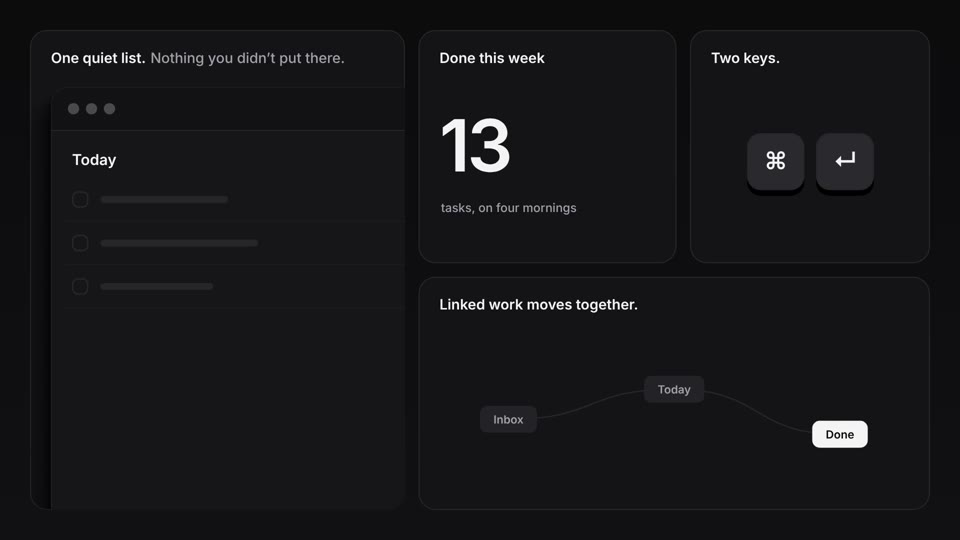
用 Mografy Stage 製作,深色風格、沒有游標。四個區塊被當成一張畫來規劃:只有一塊顯示 App,其他是數字、物件和圖解,相鄰的區塊不會是同一種。按下兩個鍵,一項任務完成、清單收合,本週數字滾動,任務一路走到 Done。然後一週重新開始。
動態解析
- 0–1.4s
1. 按鍵
物件區塊裡的 ⌘ 和 ↵ 被按下。
- 1.4–2.2s
2. 完成
任務打勾、劃掉,清單收合。
- 2.2–5.7s
3. 它移動了
12 滾到 13,一個小點從 Inbox 走到 Done,接著一切一起重置。
開啟場景
下載並解壓縮專案,再以已安裝的 Mografy CLI 開啟。
下載場景專案npx mografy dev ./stage-bento安裝好 Mografy 後, npx mografy add stage-bento 會把同一個專案複製到 Mografy 工作區的 examples 資料夾(沒有隨安裝附上的影片會從 Showcase 下載)。動畫程式碼在 scenes/main.ts ,輔助函式位於 scenes/stage.ts。ZIP 內含 Inter 字型檔與授權文件。
原始提示詞
閱讀創作需求
Use Mografy Stage to make a dark bento section for a fictional task app called Fieldnote, 6 seconds, looping, no cursor. Plan the grid as one picture: one tall tile shows a piece of the app, the others are a stat, an object and a small diagram. One event should run through all of them: two keys are pressed, a task is done, the weekly count rolls up, and the task travels into Done. Then the week resets.