

總覽
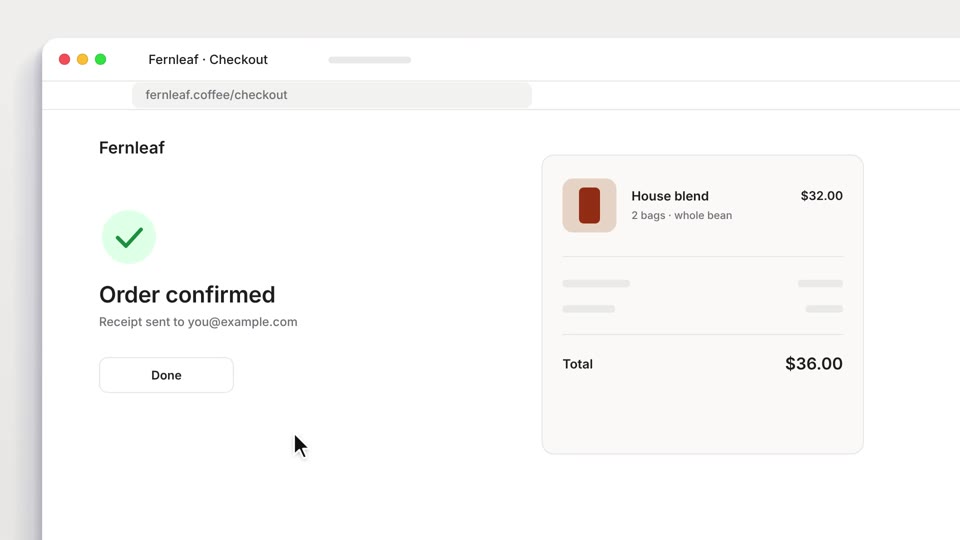
用 Mografy Stage 製作,在有分頁的瀏覽器裡。輸入 email,按下 Pay,按鈕轉著讀取圈,接著表單讓位給確認畫面,打勾記號自己畫出來。按 Done 回到空白表單,就是 loop。付款欄位刻意保持 placeholder 線條。
動態解析
- 0–2.8s
1. Email
點擊欄位,輸入地址。
- 2.8–4.5s
2. 付款
按下 Pay,按鈕轉著讀取圈。
- 4.5–9s
3. 已確認
打勾記號畫出,確認畫面停留,Done 讓表單重置。
開啟場景
下載並解壓縮專案,再以已安裝的 Mografy CLI 開啟。
下載場景專案終端機
npx mografy dev ./stage-checkout安裝好 Mografy 後, npx mografy add stage-checkout 會把同一個專案複製到 Mografy 工作區的 examples 資料夾(沒有隨安裝附上的影片會從 Showcase 下載)。動畫程式碼在 scenes/main.ts ,輔助函式位於 scenes/stage.ts。ZIP 內含 Inter 字型檔與授權文件。
原始提示詞
閱讀創作需求
Use Mografy Stage to make a looping checkout demo for a fictional coffee roaster called Fernleaf, in a browser with tabs. Type an email, press Pay, show a short spinner, then a confirmation with a check that draws itself. Done goes back to the empty form. Keep the payment details as placeholder lines, and show one real line item in the order summary.