

總覽
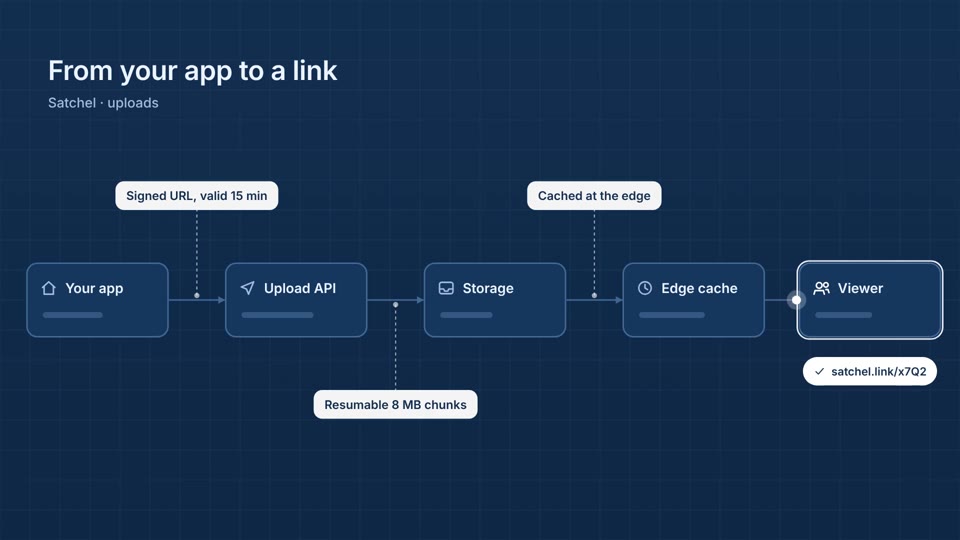
用 Mografy Stage 製作,藍圖風格、沒有游標。一個檔案從你的 App 經過四個服務變成可分享的連結,每一段都有一則簡短註解,只說開發者需要知道的事。註解在線的上下交錯,所以不會互相碰撞。
動態解析
- 0–2.0s
1. 簽名網址
檔案離開你的 App;第一則註解先畫出引線,再出現標籤。
- 2.0–4.4s
2. 分塊與快取
三個分塊傳到儲存空間,再到邊緣節點。
- 4.4–7.4s
3. 一個連結
觀看者拿到連結,停留一下,圖解淡回原樣。
開啟場景
下載並解壓縮專案,再以已安裝的 Mografy CLI 開啟。
下載場景專案終端機
npx mografy dev ./stage-upload安裝好 Mografy 後, npx mografy add stage-upload 會把同一個專案複製到 Mografy 工作區的 examples 資料夾(沒有隨安裝附上的影片會從 Showcase 下載)。動畫程式碼在 scenes/main.ts ,輔助函式位於 scenes/stage.ts。ZIP 內含 Inter 字型檔與授權文件。
原始提示詞
閱讀創作需求
Use Mografy Stage to make a looping blueprint diagram for the API docs of a fictional storage service called Satchel. Show how a file goes from the customer’s app to a shareable link: Upload API, storage, edge cache, viewer. Add one short annotation per hop, no more. No cursor, nothing decorative, and keep each node to its name.