

總覽
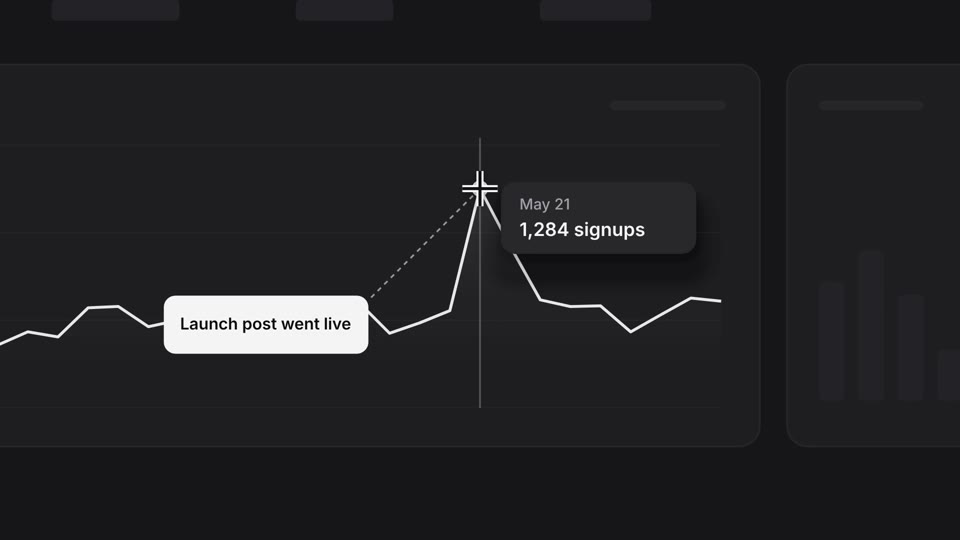
用 Mografy Stage 製作,採用深色風格與側欄浮起的新版 macOS 視窗。游標找到註冊圖表上唯一的高峰,提示框給出答案,鏡頭推近,同時一則註解說明原因,然後一切緩緩回到原位。儀表板上其他地方都沒有文字。
動態解析
- 0–1.6s
1. 找到它
游標移到高峰;輔助線、資料點與提示框淡入。
- 1.6–4.8s
2. 說明它
鏡頭推近,一條引線從資料點畫出,一個標籤說明這個高峰。
- 4.8–6.5s
3. 緩緩回來
鏡頭拉回,標籤和提示框離開,游標回到起點完成 loop。
開啟場景
下載並解壓縮專案,再以已安裝的 Mografy CLI 開啟。
下載場景專案npx mografy dev ./stage-dashboard安裝好 Mografy 後, npx mografy add stage-dashboard 會把同一個專案複製到 Mografy 工作區的 examples 資料夾(沒有隨安裝附上的影片會從 Showcase 下載)。動畫程式碼在 scenes/main.ts ,輔助函式位於 scenes/stage.ts。ZIP 內含 Inter 字型檔與授權文件。
原始提示詞
閱讀創作需求
Use Mografy Stage to make a 6–7 second dark hero for a fictional analytics product called Lumen. Show a dashboard in the newer macOS window. Something spiked on the signups chart: the cursor finds it, a tooltip shows the day and the number, and the camera leans in while one annotation explains why. Then ease back out and loop. Keep about six real words on the whole dashboard. The second card can run off the right edge. No legend and no extra charts competing for attention.